Showing posts with label iPhone. Show all posts

The best way to listen to music with iPhone or iPad

Departing from the beginning of the sentence above, which may sound controversial to some other OS users, considering the features of music has become a mandatory feature of mobile devices. Not only mobile phones, but also tablets and handheld. We then challenged to be able to make effective use of music features that used to be called the iPod (now called the Music feature).

Okay, basically all the music player on the phone is the same. Namely play digital music files stored on the phone - to your ears through a variety of means. The first is the speaker phone and tablet, then there is a standard earset or through external speakers. But before echoed through the various ways mentioned above, it helps you to know a number of functions in order to get the maximum value from a file iOS music player.

Do the Shuffle
If you have hundreds or even thousands of music files in your iPhone, then the best way to listen to music is to do a shuffle. There is a sensation of shock when the system play your tunes even scrambled for some people might be ruffling your emotions, depending on the collection of songs that you have.
You can do so by selecting the track list. Appear on the top line with a shuffle option image intersecting arrows. If this happens the decision to shuffle when a song is being played, please enter now playing screen, then touch the shuffle icon.

Manually set the mood with Playlist
If you do shuffle impressed ruffled mood, then you can set the mood yourself manually using the list of songs played, aka playlist. Thus you can create a list of songs to listen to while studying, lunch or even when driving.
The trick is to go to the playlist page and then tap Add Playlist ..., name your new playlist, you will be taken to the page of the song. Tap the arrow on the right side of each song title to add it to the playlist.

Genius Playlist, Anyone?
One of the interesting features of iOS player is Genius Playlist. Where the system will collect the songs that type with the first song you choose. Condition, the number of songs stored on your iPhone, including very many. If not then the genius playlist will always show a notification that the number of songs that fit the first song does not meet the quota.
Steps that need to be done, too, was simple. Because, basically, you just tap the Genius Playlist and choose one song "sign" and the system will create a playlist according to the ID3 data.

Set the Color with Graphic equlizer
Every song has a tendency frequencies different from other songs, and every human ear is not the same in judging a musical. For this reason the existence of equalizer settings to be important. If may be categorized, every music enthusiasts simply divided into three groups which have a tendency to love the tones low alias bass head, or high and flat. While the color of your favorite music can be changed through the equalizer available in settings by default. To perform this setting you can go to Settings> Music> EQ.

Use Third-Party Applications
If it is a standard feature the iPhone does not meet your needs of listening to music with maximum then you need a third-party application. Do not worry, a lot really. And each gives additional value for your mobile phone.

iPhoneography: Photography with Your Phone

The realm of photography enlivened by the presence of a new term called iPhoneography. As the name implies, the term is used as a weapon iPhone devices. Well, it was so popular iPhoneography, two schools in the UK offer courses specifically for the iPhone photography. Kensington and Chelsea College is in West London which offer this learning.

iPhoneography: Photography with Your Phone“Get started in photography on the iPhone and turn your iPhone into an exciting creative tool. You will learn the key techniques and skills needed to transform plain iPhone snaps into amazing images. As part of a group, we explore some of the most powerful and creative apps and introduce you to ways to share and present your work in a vibrant iPhoneography community, taking inspiration from leading proponents of this ground-breaking new photography genre.” the description of these subjects.

The course has been dubbed “iPhoneography: Photography with your iPhone” and will set students back £115 (~$182) with an additional budget of £20 set aside for iPhone photography apps. Interested in signing up for the course? Head on over to the Kensington and Chelsea College’s website for more info.

Instagram, the best 2011 iPhone apps

Instagram photo sharing application successfully get rid of Angry Birds, Facebook, and a row of other interesting applications for the title iPhone App of the Year. Meanwhile, social networking applications Facebook has no doubt that his fame was in the first position of the free iPhone application. Instagram lets you shoot photos, apply polaroid-like filters and share your creations on Facebook, Twitter, Tumblr and other popular social networks.

Instagram, the best 2011 iPhone apps
Its attractive interface and ease-of-use. Last year's "App of the Year" award went to iPad newsreader Flipboard. An iPhone version of Flipboard debuted on December 7.

As for the rest of the iTunes Rewind 2011, Apple also chose Tiny Tower as its favorite gaming app for iPhone. When it comes to Apple's iPad favorites, the company selected photo app Snapseed as its "iPad App of the Year" and Dead Space as "iPad Game of the Year."

And what did iTunes customers choose as their favorite apps of the year? Well, it should come as no surprise that Angry Birds was one of the most popular apps on the iOS platform in 2011. In both the paid and free categories, Rovio's smash-hit game received the most downloads of any iPad app. The game was also the top seller among iPhone apps, while Facebook nabbed the top spot for most-downloaded free iPhone app.

In addition to apps, the 2011 iTunes Rewind also highlights users' most-downloaded content in categories like Books, Music, TV Shows, Movies and Podcasts.

The beauty of cyberspace information from Flipboard on the iPhone screen

Flipboard comes to the iPhone, applications that provide convenience and uniqueness while reading the information that only you like, be integrated with the websites you choose, ranging from personal social networks like Twitter, Facebook, LinkedIn, Instagram, until the site or google reader who wants you read every day via RSS Feed.

The beauty of cyberspace information from Flipboard on the iPhone screen
You only need to open a page per page and the information is presented directly on the iPhone screen in portrait form, slightly different than what appeared on the big screen iPad which can be read either portrait or landscape.

For you who always likes to read whenever and wherever, Flipboard application may be an option as a friend who is always in your grasp, without the need behind the latest information updates, and does not require manual application one by one of its affiliated websites.

If you have previously been using versions of the iPad, then you will be given the ease when reading it in the iPhone version, by creating a personal account in Flipboard, and do log Flipboard on the iPhone, and soon the whole site synchronization links that you have created, will be exactly similar to the your iPhone device.

Download Flipboard Application for iPhone for free through iTunes.

Tutorial how to unLock the iPhone 4S

iPhone 4S already launched some time but until now there is no way like the previous editions such as unlock the iPhone from Dev Team with ultrasn0w.
Tutorial how to unLock the iPhone 4SLuckily, the hole in the new iOS 5 update turned out to make the iPhone 4S can be unlocked without the need to jailbreak. How to unlock was discovered by MacRumors forum members on the iPhone that operates on the AT & T. How to unlock the iPhone 4S without any software or hardware tweaking. The unlock will assist you in using your iPhone 4S on T-Mobile’s network as long as you have a T-Mobile SIM card.

Before you get started, go ahead and cut down your T-Mobile SIM card to match your AT&T SIM card’s size. Go ahead and give the following directions a try:

1. Insert original carrier AT&T SIM card
2. Dial 611 for AT&T customer service hotline and drop the call
3. Turn on Airplane Mode
4. Take out AT&T SIM card
5. Insert T-Mobile SIM card
6. Make sure WiFi is off (also tap on ‘Forget this Network” to make sure it doesn’t connect automatically later)
7. Switch off Airplane Mode and iPhone will search for network. This is followed by the Apple splash screen appearing.
8. Activation Required will be displayed on the screen
9. EDGE network will activate automatically – notice the ‘E’ on the top left corner of the screen
10. Wait for about 20-30 seconds and turn off the phone
11. Turn on iPhone and the same Activation Required screen will be displayed
12. When you see one signal bar, tap on Use Cellular Connection
13. Eject SIM card
14. Activation Required screen will be displayed the second time
15. Insert SIM card
16. Unlocked!

The unlock also works with the iPhone 3GS and iPhone 4, and will need to be done again if you reset your device.


Unlock tutorial has also been documented in a video uploaded to YouTube. The steps in the video can not be confirmed fully unlock the mobile operator. Therefore iPhone owners are welcome to do this tutorial at your own risk.

Comparison of the iPhone camera from generation to generation

Improving the quality of the camera that made ​​Apple on its iPhone devices is documented by a creator Camera + application. Here, the comparison of the iPhone camera catches photo from generation to generation: iPhone 2G, 3G, 3Gs, 4, 4s, can be traced. Is Lisa Bettany, creators Camera + application, using five different models of the iPhone in order to photograph the same subject.

Comparison of the iPhone camera from generation to generation
Seen in each photo has different levels of striking clarity and focus. The original iPhone's primitive 2-megapixel snapper was largely derided and considered the phone's weak spot, during a time where huge focus was placed on the quality of a handset's camera. The device steadily improved from 3-megapixels, to 5-megapixels, with the iPhone 4S serving up an 8-megapixel sensor and dramatically improved lens technology.

On the Camera+ website Bettany says that the new iPhone 4S even beats many of the high-end compact cameras on the market.

She says: The iPhone 4S is dramatically clearer and sharper than previous iPhone versions. Using separate focus and exposure in Camera+ on the iPhone 4; 4S significantly helped create a more balanced exposure. "While it's not nearing the same quality as a professional level dSLR, it is comparable to a top of the line compact camera and even outshines it in some ways."

Check out the Camera+ post to see the comparison in full, featuring all five iPhone models as well as the Canon S95 compact camera.

Blogger app for the iPhone release

Blogger has finally released an application for the iOS operating system. This is the first official application issued by the Google's blog service. This application is of course welcomed by the bloggers because with this application they are permitted to publish blog posts directly from their phones. Unfortunately, the services provided by this application is not a full service, because users can not do edit the template or HTML, as well as manage the comments through the application.

Blogger app for the iPhone
So that only the major activities are displayed by these applications that store (save), edit (edit) and publish posts, including uploading photos and adding location information. This application will be available to users iOS 3.2 and above. Its user interface is said to like Blogger app for Android.

In the arena of blogging service, Blogger was overshadowed by the middle of other services like WordPress, Tumblr and other competitors. That is why Google, as the owner of Blogger has made some effort to make Blogger relevant again.

Photovine, Google's photo application for the iPhone

Success Instagram intended for photo enthusiasts inspired Google to release a similar application for iPhone users. This application is called Photovine, when compared with Instagram, this application has a number of advantages and disadvantages.
PhotovineCreated by a team of "Slide" which had been acquired by Google, Photovine offers features to be 'selling' of the application. On the one hand, opening up everyone's photos to everyone else helps gives Photovine a way around the network effect--most social apps struggle because they're only useful so long as enough users in a person's social circle sign up--and it means the app appears busy and populated even if few of a user's friends have signed up.

On the other hand, how interested are we in looking at strangers' pictures? There's an anthropological (or voyeuristic) appeal to seeing what photos people post in the Vine "At My Bedside" or "Things I See When Traveling," but people might tire of browsing through unknown users' images. After all, Facebook's genius was in showing people photos of other people they knew, a feature that quickly got its users hooked.

Photovine
Though the app could be downloaded before, it was available only to a limited number of users and by invitation only. The current version is open to everyone--except the users of Google's Android mobile operating system, oddly enough, as Photovine is only available as an iPhone app on iTunes Store.

McAfee WaveSecure protect iPhone user data

The issue of losing important data if the device is lost no longer occur on the user's PC because now the same issue is now also faced by mobile users. For this reason the antivirus software vendor McAfee launch the following applications. Named McAfee WaveSecure.
This application will help iPhone owners who lost his cell phone to protect data stored in it until he was backing up important data to other devices. Thus, important data can remain secure.

McAfee WaveSecure“We’ve been in mobile security for about ten years, but we’re in a period of rapid changes now,” said Lianne Caetano, director of product marketing for McAfee consumer mobile solutions, in an interview. “Now we have a very heterogenous environment, and we have to make sure we work seamlessly.”

With WaveSecure, users can back up contacts, photos, and videos as well as remotely track the location of their iPhones via the McAfee WaveSecure online portal. Users can wirelessly restore their contacts, even to an Android device. If the device is lost, stolen, or damaged — or if the user accidentally deletes data – consumers can get their data back.

“That’s important because these phones are extensions of who we are,” Caetano said.

Caetano says that the odds that someone will lose a smartphone in a year are pretty good, and many users have a lot of business information on those phones. The cost of losing corporate data can be very high. Yet users have not been educated about adding protection to their phones, for the most part.

Santa Clara, Calif.-based McAfee got the WaveSecure technology via its acquisition of tenCube, the creator of WaveSecure, a year ago. The WaveSecure backs up a user’s data and restores it if needed. The app is now available on the Apple App Store for $19.99. The WaveSecure product is already available on a number of other mobile software platforms.

Rivals such as Lookout Mobile Security offer a free download for its antivirus protection and then charge $29.99 a year for online backup and remote tracking of lost phones.

McAfee has had a mobile security product for a decade called Virus Scan Mobile, which was focused early on in the Symbian market and was extended recently to the Android mobile operating system. About a year ago, McAfee acquired Trust Digital to get an enterprise mobility product, dubbed Enterprise Mobility Manager.McAfee also has a mobile web security app called McAfee SiteAdvisor.

McAfee combined these different offerings as a suite of products called McAfee Mobile Security in June, said Caetano. More apps are expected to be added to McAfee’s mobile suites over time.

The iOS app is available in English, Chinese (Simplified and Traditional), Danish, Dutch, Finnish, French (European and Canadian), German, Greek, Indonesian, Italian, Japanese, Korean, Norwegian, Portuguese (European and Brazilian), Swedish, Spanish (European and Mexican) and Russian.

Child ID, the first mobile application from the FBI

Federal Bureau of Investigation (FBI) launched their first mobile application. The following application is intended for parents who lost her son. Application called Child ID is working on an iPhone device. Services and tips in it are useful for parents who had the tragic events of losing a child. "You're shopping at the mall with your children when one of them suddenly disappears. A quick search of the nearby area is unsuccessful. What do you do?" reads a new FBI promotional ad for the application.

Child IDChild ID provides a convenient place to electronically store photos and vital information about the user's children. According to the FBI, the intent is for the user to have the information immediately available in the event of an emergency. "You can show the pictures and provide physical identifiers such as height and weight to security or police officers on the spot," the bureau said in a press release. "Using a special tab on the app, you can also quickly and easily email the information to authorities with a few clicks."

In addition to storing a child's vital information, the app includes tips on keeping children safe as well as specific guidance on what to do immediately after a child goes missing. The application is free and can be downloaded through iTunes. According to the website, it is compatible with iPhone, iPod touch and iPad.

VooMote One, change the iPhone into a remote TV

Manufacturers based in Germany called Zero1.tv released an application called The VooMote One who can 'transform' your iPhone into a multi function controller.
Not only could make an iPhone as a remote TV, applications can also arrange other electronic devices. The VooMote One can work in almost all models of televisions, can also be run on a DVD player and stereo so users do not need to move to exert control on those goods.
Just by touching a finger to the buttons on the phone, users can run a full control.

VooMote One
This application works with the help of wireless technology and capturing more than 30,000 infrared chords and hundreds of electronic devices. If summed VooMote compatible with 574 TV brands, 995 brand Top Box / DVR, 151 brand and CD audio.

Another convenience that can be obtained by the user Zero1.tv is to have features of 'Control Room' which allows users to categorize the tools that he wanted to control based on location, for example living room or kitchen. Then with the "One Touch", the user can store frequently used commands and set the number of orders with just one click.

Adding an add-on in your iPhone device will not interfere with the function of smartphones like the camera, the on / off or incoming calls. Unfortunately, the devices can also work on the iPod touch (2G-4G) is only available in the United States at a price of $99.

Seagate Wireless Drive for iOS devices

You have the iPad, iPhone or iPod Touch, and require large file storage space? Product GoFlex Satellite wireless storage drives from Seagate might be that you need. GoFlex Satellite offers storage capacities up to 500GB.
Uniquely, GoFlex Satellite is a wireless drive that can be accessed via Wi-Fi 802.11 b / g / n. On this drive there are beterai Li-ion polymer rechargeable. In standby mode the battery life to 25 hours and during use on an ongoing basis, such as streaming video, battery life up to 4 hours. It is sufficient to play about two films duration 2 hours continuously. To charge the battery again, provided the electric charger and the charger for the car.

Seagate GoFlex Satellite Mobile Wireless StorageDrive is connected with the iPad or other devices using free applications GoFlex Media. Apple's iTunes and App Store to provide this application. Yes, indeed for a while this new Satellite GoFlex available for Apple devices that run the iOS operating system. According to Seagate, applications for Android devices will be available this summer.

GoFlex Satellite can also be connected to a Windows PC or a Mac with OS X. This connection can also be via a USB 3.0 cable provided. The cable is compatible with USB 2.0 ports.

With Media Sync software from Seagate is also provided, the user can download music files, videos, photos, or other document from the computer. Of course, those files must be compatible with the IOS device.
GoFlex Sattelite pivot can be ordered through Amazon.com. The price is $ 199.99.


Features:
GoFlex® Satellite™ Mobile Wireless Storage. Take your media library with you. Stream it to your iPad.
* Take more than 300 HD movies on-the-go1
* Stream media over Wi-Fi to 3 iPads at the same time
* Automatically sync media and documents from your PC or Mac computer
* Up to 5 hours battery life2

Portable
Your entire media library, as mobile as your iPad
The GoFlex Satellite device goes wherever your iPad goes and lets you wirelessly access all your movies, photos, music and documents. No more worrying about running out of space on your iPad.
* 500GB of storage capacity
* Up to 5 hours battery life2
* Up to 25 hours standby time2

Three different HD movies. Three different iPads—all at the same time
Everyone in the family can wirelessly access the hundreds of movies you load on GoFlex Satellite storage.
* Stream to almost any Wi-Fi enabled device using a web browser or the free app optimized for iPad

Tablets and Smartphone Storage
Works with tablets and smartphones too
Stream to almost any device that has Wi-Fi connectivity and a web browser—including laptops, Android® phones and tablets, iPhone®, iPod Touch® and more.

Stream media wirelessly
With a GoFlex Satellite device in your backpack you can stream all of your HD movies to your iPad—without tangled cords or cables.
* 802.11 b/g/n Wi-Fi delivers reliable skip-free streaming
* Wi-Fi range of more than 30 feet

Easy access to your media
Use the free app or your device's web browser to easily access and stream your media library wherever you are.

Simple 1-2-3 setup
Simply plug the GoFlex Satellite device into your computer and load your media. Next, charge it with the included portable wall charger or car charger. Now you're ready to start wirelessly streaming media to your iPad for up to 5 hours2 of continuous play!

Flexible
The GoFlex Satellite mobile wireless storage device is part of the Seagate® GoFlex Storage System. This innovative system makes it incredibly easy to upgrade or change the interface on your GoFlex Satellite device, so you can always get optimal transfer speeds when loading and syncing your media.
* Includes USB 3.0 connectivity for fast data transfers (fully compatible with USB 2.0)3
* Other available interfaces include FireWire® 800 and powered eSATA (sold separately)

Load media from both PC and Mac computers
Simply plug the GoFlex Satellite device into your PC or Mac computer to quickly sync your media library.

What's in the box
* GoFlex Satellite mobile wireless storage device
* USB 3.0 USM adapter with detachable USB 3.0 cable
* Compact wall adapter with retractable pins
* Compact car charger
* USB to DC cable
* Quick start guide
* 3 year limited warranty

dexim P-Flip DCA223 Foldable Solar Power for iPhone 4

dexim P-Flip DCA223 Foldable Solar Power for iPhone 4

dexim offers the P-Flip DCA223 foldable solar power charger for iPhone 4. Instead of an adapter, the DCA223 comes as a foldable stand with two camouflage-colored solar panels that convert the sun's rays into juice for your iPhone. It takes around 15 hours of exposure to natural sunlight to fully charge the internal 2000mAh Lithium Polymer battery or simply use the included cable.

The P-Flip DCA223 also serves as a foldable dock for charging and syncing iPhone 4. It is priced at $79.9 (just $59.95 at Amazon).

[dexim]

Enable Multitasking on iOS 4, Backgrounding on All Apps

iOS 4 introduced application backgrounding which made multitasking possible. Most reliable apps have been updated by their developers to support this iOS4 Native feature. However, there are still lots of apps, that don't have it supported by default, here is a neat trick to make restricted apps run in background & Multitask.

Go Native is a Cydia based tweak that is neater than "backgrounder" app, since it lets apps multitask natively.

go-native gonative

One important thing to note is that this tweak only supports iOS devices that support native multitasking. So devices like the iPhone 3G are not supported. This tweak does not add any additional icons to your springboard, but it's configurable through the Setting application on your iOS device.

You will, of course, need to have a jailbroken iOS 4.x iPhone, iPad or iPod Touch.

Gear4 UnityRemote Turns iPhone/iPad/iPod touch into Universal Remote

Gear4 UnityRemote Turns iPhone iPad iPod touch into Universal Remote
Here is another universal remote accessory for iPhone, iPod touch and iPad, the UnityRemote from Gear4. The UnityRemote allows users to control their multimedia devices, from TVs to Hi-Fis, Blu-Ray players to digital TV boxes, anything that has an infrared receiver, using their iDevices.

UnityRemote works with two parts – an app, which is downloaded for free from the Apple App Store, and a small device that can be placed anywhere in the room. The UnityRemote device receives a Bluetooth® signal from the Apple device, and then sends an infrared command in 360 degrees via five infrared transmitters to the device to be controlled.

Gear4 UnityRemote works with iPhone 3G, 3GS, 4; iPod touch 2G, 3G and iPad. You can get one at Amazon for $99.

How To Save and Dial Phone Extension

Save Phone Extension in iPhone Contacts #1I believe every iPhone user should know how to save a phone number in Contacts. That's trivial. But how about a phone number with an extension number? Do you know how you can save phone extension in Contacts?

Increasingly, businesses are using automated menus to answer customer phone calls. It's not uncommon you hear a mechanical voice prompting you with instructions like:

Banking services, please press 1.
Credit card services, please press 2.
Insurance services, please press 3.
If you need to talk to our customer service office directly, press 8.

Sound familiar to you, right? You need to input appropriate extension to select the corresponding option. Sometimes, you even need to key in several inputs before you can reach the right service. That's really annoying. Is there any way to save these key sequences in contact so you don't have to dial them again and again?

If you don't know how to do so, you probably miss a key feature for saving contact on iPhone. When entering a phone number with the numeric keypad, there is a +*# button. After tapping on the button, it'll display a "Pause" button on keypad. This is a very handy button for saving phone extension for a contact.

Saving Phone Extension in Contacts

Let's say, your friend's office phone number is 123456789 with the extension number 7890. To save this phone number in Contacts, simply key in "123456789″ and press +*# button. Next, press the "pause" button and it displays as a comma in phone number. The "pause" instruction tells iPhone to add a friendly pause when dialing the number. Right after the comma, key in the phone extension 7890. That's it. Now when you call up your friend, iPhone dials the main number, pauses for a while and then it dials the extension automatically.

Save Phone Extension in iPhone Contacts #1Save Phone Extension in iPhone Contacts #2

Saving Key Sequences when Dialing Customer Hotline

The same technique can also apply to customer hotline with an automated answering. By saving the sequence of keys to input, this can save you significant amount of time when dialing the hotline. For instance, when you call up the customer hotline (e.g. 8724-2332), you use to key in the following sequence in order to reaching the customer service office:

Press "2″ for Insurance —> Press "1″ for Life Insurance —> Press "8″ to talk to our customer service officer

To automatically dial the customer hotline and input the key sequence (2 -> 1 -> 8), you need to save the phone number as "87422332 ,2,1,8″. As mentioned earlier, the comma represents a friendly pause. When you dial the number, iPhone will automatically dial the main number, pause for a while and key in "2″ on behalf of you. Later, it pauses again and key in "1″. Then pause again and key in "8″ automatically.

Save Phone Extension in iPhone Contacts #3Save Phone Extension in iPhone Contacts #4

It's a really nice feature that saves a significantly amount of time particularly when you have to call up the customer service hotline frequently. Try out this tip and let us know what you think.

Easy way to enable AirPlay from iPhone to Mac


After making it possible to Enable AirPlay with all apps on iOS Phone, iPod Touch, Erica Sadun has now released AirPlayer for Mac OS X which mimics as Apple TV (2nd-gen) to playback videos from iPhone, iPad and iPod touch to your Mac. Its always a good idea to play video on a huge HD cinema display than your portable devices when you are nearby.

How AirPlay for Mac works

AirPlayer is the app that makes AirPlay on Mac possible. AirPlayer creates and advertise a custom Bonjour AirPlay service that pretends to be an Apple TV. Bonjour is Apple's zero configuration networking solution for allowing devices and applications to communicate with each other over local area networks. When Apple created AirPlay, it basically set up a new way for Apple TV to interact with iOS using Bonjour communications.

AirPlayer is a basic OS X application that more or less pretends to be an Apple TV. By interacting with iOS devices the same way that Apple TV does and providing the same kinds of services and feedback, AirPlayer allows you to use your iDevice's built in AirPlay support to send video to your Mac.

Don't worry if you don't understand any of that, all you need to do is install the app from the link at the bottom. No jailbreaking, no extra effort, all you need is an iPhone, iPad or iPod touch which is running iOS 4.2.1, and a Mac running AirPlayer software.

Note: If you plan on using AirPlay with third-party apps you will have to jailbreak your iOS device on iOS 4.2.1, and Enable AirPlay with all apps. Default apps work as is, watch it in action below, and Download:

Download AirPlayer (Mac)

Google Latitude for iPhone as a Native App

In July 2009, Google announced the release of Google Latitude to iPhone but just as a web app. After a year and four months, the company finally brings the Latitude product to iPhone as a native app which is now available on App Store for free.

Google Latitude is a location-aware application for mobile user to share the location with friend, coworker or anyone in your contact list. It uses the built-in Global Position System (GPS) of iPhone (or cell tower location if GPS is missing) to find out your location. You can then share your location with friends or family members. At the same time, you can also view the location of your friends in a map. With the support of multitasking on iOS 4.0 (or up), location sharing can be done in background. Even you close the Latitude app, it can still track your location and share with your friends.

According to Google, here are what the Google Latitude can do for you:

Latitude's focus has always been on one goal: make it simple to stay in touch with friends and family by sharing where you are with each other. Simple setup. Simple sharing without fumbling for your phone. Now, you can use Latitude on your iPhone just like the more than 9 million people actively using it from Android, BlackBerry, Symbian, and Windows Mobile smartphones. Use the app to:
- See where your friends are
- Share your location continuously with whomever you choose
- Contact friends by phone, text message, or email
- Control your location and privacy

Concern about privacy? The Google Latitude is an 100% opt-in service. That means, location sharing is not turned on by default. You have to add your friends to share your location and only those friends you authorize are able to view your location on a map. The app also lets you disable background location update and hide your location if you like. To learn more about privacy settings, you can further check out Google's support page.

I have just downloaded the app. So far, I like it and it works much better than the web app. The Google Latitude app is completely free and you can give it a shot by clicking this direct iTunes link.

Also don't forget to check out the video demo:

What Else Does Google Books Offer to iPhone/iPad eBook Readers?

What does the Google Books app from Google, free for iPhone and iPad, bring to the table for digital eBook consumers that the Amazon Kindle and Barnes & Noble Nook apps don't already? Previously known as Goggle Book Search and Google Print, Google Books will, of course, be on top of in-book search technology. You will need state-of-the-art text search with the over 23 million titles it also brings in. Just for the record, Amazon Kindle clocks in with over 750,000 titles and B&N Nook boasts over 2 million, just a wee bit behind Google Books.

Logging onto Google Books requires a Google account and WiFi/3G to access your personal library. However, they do start you off with complimentary copies of "Alice's Adventures in Wonderland," "Great Expectations," and "Pride & Prejudice." Google Books come in either ePub and scanned PDF formats with select titles available in both. While it takes time to download new titles, you do have the added freedom to read a book while it is being downloaded, which is distinct among other eReaders.

Much like Amazon Kindle (which recently launched a web browser version as well), Google Books offer a free eReader app for Android and can be accessed via browser on both PC and Mac, allowing you to read on multiple devices and synch between them as well.

Yes, you can customize your text size, fonts, and background as well (either black or white). There is even the seemingly requisite among ebook readers animated page flip.

However, in the end, we come back to its powerful search capabilities. Type the keyword, which we have all been trained on Google Search to do then tap on the search results closest to what you are looking for.

If you think, however, purchasing titles (there are a lot of public domain ones accessible for free) will be seamless, you will be wrong. Much like with Amazon Kindle and Nook, you will be taken to the Safari browser to buy eBooks. Managing your collection will also require you to go to either your iPhone/iPad browser or desktop/laptop.

In the past 6 years, Google has digitized over 15 plus million books as part of this initiative, even becoming guilty of copyright infringement at some points, but also quickly settling its disputes. You can imagine the immense library Google is working up too! That is probably where Google Books will eventually distinguish itself.
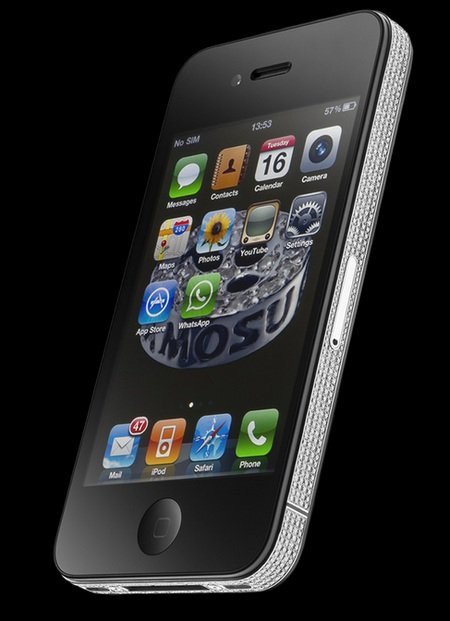
Luxury iPhone 4 Diamond Spider edition

Amosu iPhone 4 Diamond Spider 1

UK company Amosu has created the iPhone 4 Diamond Spider edition. The luxury iPhone 4 comes with 846 brilliant cut diamonds with VVS1 clarity, F color, totaling 5.36 carat. You can even choose the color of the back of this Diamond Spider iPhone.

Amosu iPhone 4 Diamond Spider

Only 10 Spider will be made and each of them comes with a special golden number of your choice. An One year 24hr free international concierge service is also included. You can get this iPhone 4 Diamond Spider edition for GBP15,000.


Blog Archive

Send latest articles in your inbox

Delivered by FeedBurner